Showing posts with label download. Show all posts

Thursday, 27 October 2016

INTERNET DOWNLOAD MANAGER (IDM) 6.26 BUILD 8 CRACK

How to Crack  IDM?

  1. Install IDM Using The Latest Setup File From IDM Download Page (Go To Page
  2. Close Software Completely (Even From System Tray)
  3. After that download Crack and Run IDM Crack.
  4. Click On ACTIVATE.
  5. Now Done! Enjoy.

Screenshots:-


 INTERNET DOWNLOAD MANAGER (IDM) 6.26 BUILD 7 CRACK


Note: For support developers always buy the Genuine Product.

Thursday, 20 October 2016

Download Now!Google's WallPaper App Available On PlayStore!


Google's WallPaper App Available For Download.
In Event Google Introduce These Features & In Pixel & Pixel XL.
But Now Via This Google's WallPaper App We Can Get This Feature In Any Android Devices.
Actually These Feature Is Availble In Windows Phone Since Windows 8.1 Now Google Bring This Feature In Android.
Google's WallPaper App Provides Daily New WallPapers In Different Categories Like
Earth, Cityscapes & Landscapes.

After Selecting Any Category App Automatically Download Daily WallPaper In Your Gallery. 

Features:-
Make the most of your display with beautiful wallpapers and advanced features. Choose one of your own photos, an image from the Google Earth collection, a scenic landscape from Google+, and more. Change it as often as you like, so your phone always represents your style.
• Enjoy a collection that keeps on growing. Access images from Google Earth, Google+, and other partners. 
• Double your fun. Show the world one wallpaper on your lock screen, and keep one for yourself on your home screen. (Requires Android™ 7.0, Nougat, and above.) 
• Start each day fresh. Pick your favorite category and you’ll get a new wallpaper image each day.

Currrently If You Search Wallpapers Then You Can't Find It In The Store.
Then 

How To Get This App?
Simple Just Click On Download Now You Will Redirect To The PlayStore & Install This App.


ScreenShot:-


Monday, 3 October 2016

INTERNET DOWNLOAD MANAGER (IDM) 6.26 BUILD 7 CRACK

How to Crack  IDM?

  1. Install IDM Using The Latest Setup File From IDM Download Page (Go To Page
  2. Close Software Completely (Even From System Tray)
  3. After that download Crack and Run IDM Crack.
  4. Click On CRACK.
  5. Now Done! Enjoy.

Screenshots:-


 INTERNET DOWNLOAD MANAGER (IDM) 6.26 BUILD 7 CRACK

Note: For support developers always buy the Genuine Product.

Tuesday, 2 August 2016

Download Windows 10 Anniversary Update ISO


There are different ways to upgrade your PC to Windows 10 or update from Windows 10 to Anniversary Update: via Windows Update or using the Media Creation Tool. But here I will talk about the best, easiest and the common method for upgrading from Windows 7, Windows 8, Windows 8.1 and even for updating from Windows 10 to the latest Windows 10 Anniversary Update. That is by downloading the ISO file and upgrading with it. You can upgrade any PC with the ISO file, but you just have to download it once. You can also use the ISO file to create a bootable drive and do a clean install.

Check your PC.
Open System Properties on your PC (press Windows + X, and then press Y, or on Windows 7 right click on Computer and click on Properties) and check the Windows edition and System type. You will need to know this for the next steps.

Download the ISO file.
  1. Open this link on Microsoft Edge or Internet Explorer: Microsoft.com/en-us/software-downlo... Press F12 to open Developer Tools.Go to Emulation and change User agent string to IE11 - WP8.1. OR Directly Open this Link Microsoft Windows 10 Download
  2. Select edition: Select Windows 10 (if you have Windows 7, Windows 8, Windows 8 Pro, Windows 8.1, Windows 8.1 Pro) or Windows 10 Single Language (if you have Windows 8 Single Language, Windows 8.1 Single Language) and click Confirm.
  3. Select the product language: Select English and click Confirm.
  4. Click on 64-bit Download. Click 32-bit Download only if your System type is 32-bit.
  5. Click Save to download the ISO file. It will take some time depending on your internet speed.
The latest ISO file name and size:
  • Win10_1607_English_x64: 4.07 GB
  • Win10_1607_SingleLang_English_x64: 3.99 GB
  • Win10_1607_English_x32: 3.14 GB
  • Win10_1607_SingleLang_English_x32: 3.08 GB
The file name depends on the edition you select in step 2 above, so make sure it is correct. The latest ISO version 1607 includes all updates released for Windows 10 until the Anniversary Update in August 2016 including security, non-security and cumulative updates. The OS build of this ISO file is 14393. Install the latest updates in Windows Update in Settings after upgrading to Windows 10 as in step 9 below or by selecting Download and install updates as in step 3 below while upgrading.
  • Links are valid for 24 hours from time of creation. If you couldn’t download within 24 hours, please follow the steps above again.
  • The Windows 10 edition in step 2 have both Windows 10 Home and Windows 10 Pro editions.
  • In step 3 English is English US and English International is English UK. It is better to select English, you can change the language later after upgrading to Windows 10.

            
Upgrade to Windows 10 with the ISO file.

  1. Open the ISO file by double clicking on it. (You will have to use a software like WinRAR to open/extract the ISO on Windows 7.)
  2. Double click setup.
  3. Get important updates: Select Download and install updates and click Next.
  4. Checking your PC: This will take some time.
  5. License terms: Click Accept.
  6. Making sure you’re ready to install: This might take a bit longer. Just be patient and wait.
  7. Choose what to keep: Select Keep personal files and apps and click Next. If it is already selected by default, just click Next.
  8. Ready to install: Click Install.
  9. Installing Windows 10: Your PC will restart several times. This might take a while.
  10. After Windows 10 is installed, open Settings > Update & security > Windows Update and click on Check for updates. Install all the updates. This includes updates for Windows 10 and drivers.
  • If it asks for Product Key in step 4, that means you are using the wrong ISO edition or your current Windows is not activated.

Saturday, 30 July 2016

INTERNET DOWNLOAD MANAGER (IDM) 6.25 BUILD 4 CRACK


Internet Download Manager (IDM) is a tool to increase download speeds by up to 5 times, resume and schedule downloads. Comprehensive error recovery and resume capability will restart broken or interrupted downloads due to lost connections, network problems, computer shutdowns, or unexpected power outages. Simple graphic user interface makes IDM user friendly and easy to use. Internet Download Manager has a smart download logic accelerator that features intelligent dynamic file segmentation and safe multipart downloading technology to accelerate your downloads. Unlike other download managers and accelerators Internet Download Manager segments downloaded files dynamically during download process and reuses available connections without additional connect and login stages to achieve best acceleration performance.

How to Crack  IDM?

  1. Install IDM Using The Latest Setup File From IDM Download Page (Go To Page
  2. Close Software Completely (Even From System Tray)
  3. After that download Crack and Run IDM Crack.
  4. Click On ACTIVATE.
  5. Now Done! Enjoy.

Screenshots:-


 INTERNET DOWNLOAD MANAGER (IDM) 6.25 BUILD 4 CRACK

Thursday, 24 December 2015

F-Droid Store installieren | Anleitung | Erläuterung

F-Droid ist eine App Store und somit eine alternative zu Google Play, so wie der Amazon App-Shop.
Hier findet Ihr Apps (Programme/Spiele), welche unter Google Play teilweise Geld kosten (zum Beispiel DAVdroid) und auch Apps, welche bei Google Play (damals Playstore) entfernt wurden.
Auf der Homepage (Link) könnt Ihr euch die APK-Datei herunterladen und darüber die F-Droid Store installieren (herunterladen, anklicken und bestätigen). Ladet euch bitte in jedem Fall die APK von der Homepage herunter und nicht über andere Seiten. 
Der große Vorteil oder besser gesagt "was F-Droid so besonders macht" ist die Auswahl der Apps. Hier wird ausschließlich freie Software verteilt (kostenlos und open source). 
Darüber hinaus könnt Ihr eigenen Paketquelle hinzufügen und auch für den Download ist keine Anmeldung notwendig - anonym herunterladen und installieren somit möglich. 
Nach der Installation werden alle Apps aufgelistet, welche bereits installiert sind aber neben Google Play auch bei F-Droid verfügbar sind. Ein bekanntes Beispiel wäre Firefox. Wundert euch also nicht, wenn gleich nach der Installation einige Apps angezeigt werden. 
Wie bei jeder anderen App Store gibt es auch hier eine Suchfunktion, welche bestens funktioniert...

DAVdroid ist Open Source, somit freie Software, welche aber von den Entwicklern bei Google Play nicht kostenlos angeboten wird. Mit Open Source werben und keine kostenlose Version anbieten hat mich eben zu F-Droid gebracht und rund 3 Euronen Spendengeld für F-Droid, da ich so für DAVdroid nicht zahlen muss. Versteht mich nicht falsch, ich bin der letzte der nicht gerne ein paar Euronen abgibt aber die Politik von DAVdroid gefällt mir überhaupt nicht, deshalb unterstütze ich lieber F-Droid. 
Unter F-Droid habt Ihr die Option auch die ältere Version zu installieren - euch wird die Wahl gelassen. Sollte mal eine Update Probleme verursachen, dann kann die ältere Version installiert werden.
Alles andere, wie der Quelltext und die Rechte werden euch angezeigt bzw. verlinkt. 
Klickt Ihr auf Installieren, dann wird die APK-Datei heruntergeladen und nach dem Download ausgeführt. 
Sollte bei euch dieses Fenster nicht erscheinen, dann klickt im Fenster (welches erscheint) auf Einstellungen und setzt einen Haken unter "Unbekannte Herkunft", damit die Installation über F-Droid möglich ist. Das soll euch nur schützen, da eigentlich alles über Google Play geladen werden soll. Sonst einfach auf Installieren klicken...
Das wäre es auch schon! 
Alle restlichen Einstellungen könnt Ihr oben rechts aufrufen (Settings).  
Beachtet dabei, dass das auch ein Sicherheitsrisiko sein kann, wie auch bei Google Play, da kaum etwas geprüft wird. Wenn aber auf der Homepage auf F-Droid verwiesen wird, dann müsst Ihr euch in der Regel keine Gedanken machen.  

Friday, 20 November 2015

WPS Office installieren | Linux

Nachdem es etwas ruhig geworden ist (nach Namenswechsel von Kingsoft zu WPS Office) gibt es wieder eine Update für Linux. WPS Office ist ein guter Ersatz für Microsoft Office, besonders wenn Ihr zusätzlich am Smartphone/Tablet arbeitet möchtet.
Um WPS Office zu installieren, bitte diese Webseite aufrufen.
Hier wählen wir .deb für Debian, Linux Mint, Ubuntu, usw. aus.
.rpm wäre Suse Linux und .tar.xz allgemein für Linux.
i386 wäre 32-bit und amd64 bzw. 64 64-bit.
Datei herunterladen und Doppelklick darauf.
Paket installieren
Einfach warten...
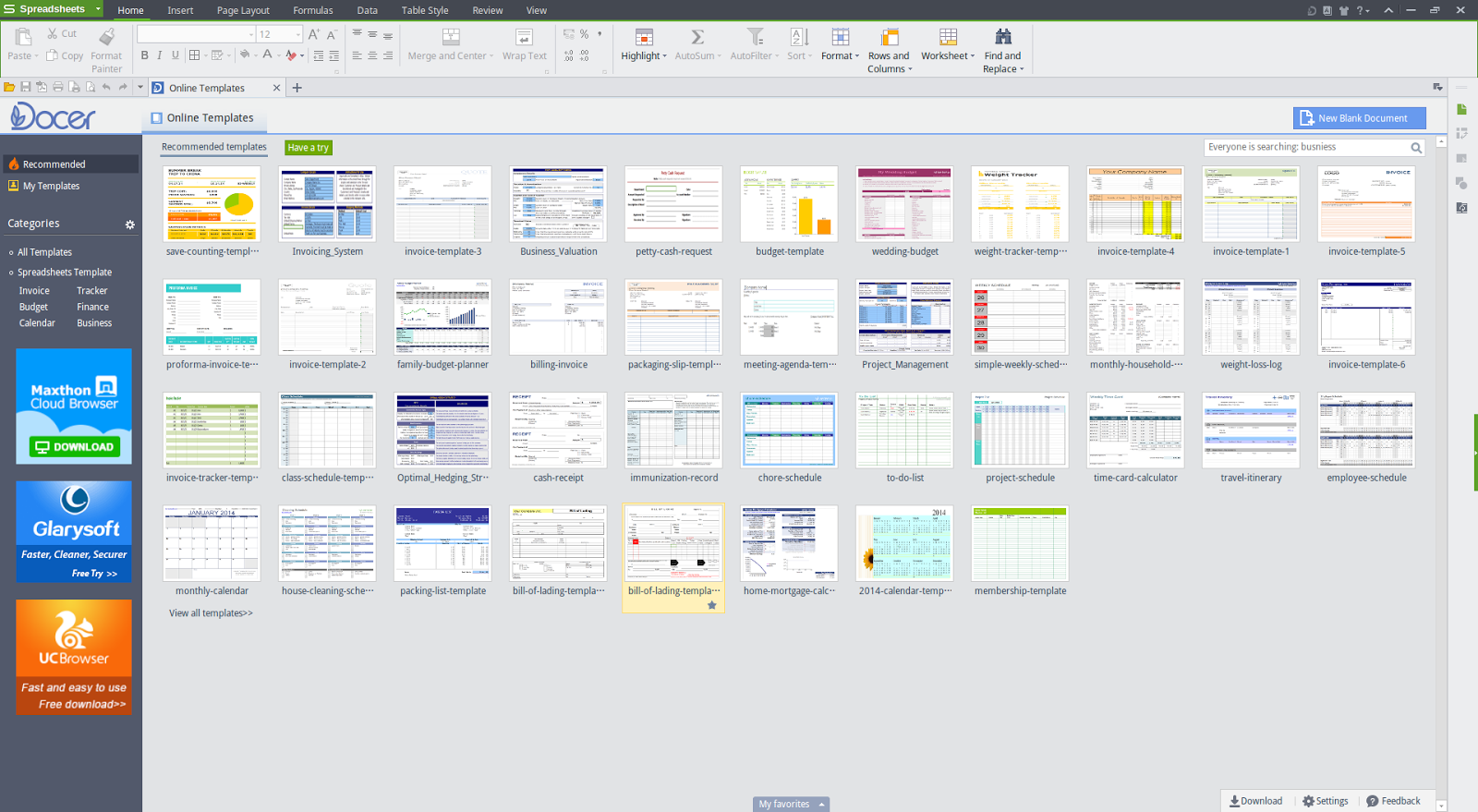
Nach der Installation einfach WPS Office aufrufen...
Jetzt auf Deutsch umstellen:
Oben rechts findet Ihr Switch Language - da bitte einmal drauf klicken
German (Germany) anwählen und mit OK bestätigen.
WPS Office nach der Meldung beenden und wieder neu starten.
New Blank Document anwählen
Es ist nicht vollständig übersetzt aber in Zukunft wird sich das sicherlich ändern.
Klickt Ihr oben links auf das Logo, dann könnt Ihr die Einstellungen aufrufen  einfach auf Optionen klicken.
Sollte euch die UI nicht gefallen, dann könnt Ihr auf UI wechseln klicken
Und diese auch anpassen.
Der große Vorteil von WPS Office - es kommt sehr gut mit den MS Office Formaten klar.

Friday, 24 April 2015

Android 5.1.x Gapps | Download | CM 12.1 | Google Apps

Wer eine Custom Rom nutzt, wie zum Beispiel CyanogenMod 12.1, der bekommt keine Google Anwendungen (Google Apps bzw. Gapps). Diese können - wie die Custom Rom selbst - über das Recovery geflasht (installiert) werden. In meinem Fall verwende ich immer TWRP.
CyanogenMod bietet Gapps direkt über die Wiki-Homepage an (Download). Dort unter Download die Datei herunterladen (immer eine .zip Datei) und dann den Hashwerte überprüfen (md5), wie oben im Bild. 
Die für mich persönlich deutlich bessere Lösung wäre nur Google Play zu installieren und dann darüber alles andere wie Youtube, Gmail, Kalender, usw. usf. nachzuinstallieren. Damit kann ich entscheiden, was ich haben möchte und was nicht.
Unter Einstellungen -> Über das Telefon bzw. Info einfach überprüfen, welche Version installiert wurde (Android-Version - in diesem Fall Android 5.1.1) und dann die Gapps suchen.
Der User TKruzze (aus dem XDA-Forum) ist bekannt für seine PA Gapps, welche es in Zukunft nicht mehr von Ihm geben wird (siehe hier). Die Dateien sind noch online, von Ihm selbst hier hochgeladen und sonst von anderen Seiten neu hochgeladen, wie zum Beispiel hier.
Pico (uni) wäre für alte Geräte, wie das Galaxy S, dann gibt es nur pico, was ich zum Beispiel nutze (Google Play und Google Play Service). Wer alles haben möchte, der wählt 5.1 Stock aus. Bedenkt aber immer dabei, dass das für "böse Jungs" ein guter Weg ist, um euch zu schaden. Aus diesem Grund gibt es diese Hashwerte, damit Ihr überprüfen könnt, ob es sich um die selbe Datei handelt oder ob diese von jemanden verändert wurde.