Showing posts with label Hp. Show all posts

Wednesday, 22 June 2016

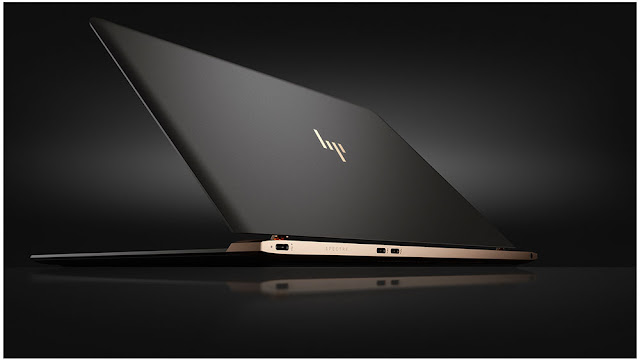
HP Launches World's Thinnest Laptop In India


Yesterday HP Announced the launch of Spectre in India.HP reimagined every element during the design of the HP Spectre to ensure the best user experience coupled with maximum performances,The result is a premium notebook PC that does not force users to compromise on style, function or performances.


Specifications:-

  • 13.3" Full HD IPS edge-to-edge display with Corning Gorilla Glass 4 which delivers a superb viewing experience for editing photos, perfecting a presentation, or watching a movie.
  • 6th generation Intel® Core™ i5 and i7 processors.
  • 8 GB RAM.
  • 512 GB SSD.
  • Stereo speakers by Bang & Olufsen with HP Audio Boost technology.
  • 9 and half hours of battery life
  • Only 2.45 pounds weight.
The Spectre will go on sale from July 29 In India At Price Rs.119,990[$1800].
Here,Some Alternatives Available

           
Discover the world's thinnest laptop, and see just how powerful thin can be.

Wednesday, 1 April 2015

HP Pavilion G6 Bluetooth Driver Latest Version Free Download For Windows

hp-pavilion-g6-bluetooth-driver
Download bluetooth driver of HP Pavilion G6 and install it on your windows operating system. Bluetooth driver of HP Pavilion G6 helps you to connect your computer with other bluetooth networks. Bluetooth driver is most important if you want to connect your HP Pavilion G6 with other networks. We provide you a latest and updated version of Bluetooth driver for your computer HP Pavilion G6. Just download this bluetooth driver and install it once on your computer. This driver is most important software that connects your computer with other computers freely. This is completely free available here to download and easy download link is available. Bluetooth driver of HP Pavilion G6 is ready to download free and protected from all type of viruses and threats. Download this driver and install it on your computer and this driver also installs bluetooth needed connectivity drivers in your computer also. So, download this driver and enjoy your work.
Description: HP Pavilion G6 Bluetooth Driver Download
Supported OS: Windows XP, 7 And Windows 8 (32-Bit or 64-Bit)

Sunday, 15 March 2015

HP LaserJet M1522NF Driver For Windows XP, 8 And Windows 7 Free Download

hp-laser-jet-m1522nf-driver-download
Hewellet Packard (HP) LaserJet M1522NF driver latest version for windows xp, 7 and windows 8 (32-bit or 64-bit) download link is completely free available here to download. If you want to download HP LaserJet M1522NF driver for PC windows. Then, you can download driver absolutely free from here. LaserJet M1522NF driver helps you to connect your device/tool easily with computers. Driver is most important thing and free software that connects all devices with computers easily.All mobiles and other type of devices drivers are completely free available here to download. So, download HP LaserJet M1522NF driver and install it on your windows operating system. This version of driver is updated and supported on all windows operating systems. Just download driver and install it. This driver is completely protected from all type of viruses and threats. 
Description: HP LaserJet M1522NF Driver Free Download
Supported OS: Windows XP, 7, 8 And Windows 7 (32-Bit or 64-Bit)

Sunday, 1 February 2015

HP Linux-Treiber installieren | Linux | Anleitung | Drucker | Scanner

Neben der allgemeinen Anleitung - Drucker & Scanner unter Linux installieren - gibt es nun mehrfach die Frage, wie HP Drucker/Scanner unter Linux zum laufen gebracht werden.
Ich besitze leider keinen HP Drucker und schreibe sehr ungerne Anleitungen, wenn ich diese nicht selbst testen kann aber in unserer Sprache gibt es kaum Anfängerfreundliche Anleitungen zu diesem Thema. Bevor Ihr beginnt - der Drucker darf nicht mit dem Rechner verbunden sein! Trennt das USB-Kabel und beginnt erst dann mit der Installation des Treibers.
Ihr könnt hier überprüfen, ob euer HP-Gerät unter Linux unterstützt wird. Einfach auf der Seite STRG gedrückt halten und einmal F drücken, STRG los lassen, dann am besten die Modellnummer eingeben, in meinem Fall 4630 und ich finde in der Liste HP Officejet 4630. Da klicke ich drauf und schaue unter Support Information ->
HPLIP wäre der HP-Treiber unter Linux. Für den HP Officejet 4630 (nur als Beispiel) benötige ich den HPLIP-Treiber ab der Version 3.13.9 (erste zeile). Support level wäre "full" - somit wird der Drucker voll und ganz unterstützt. Weiter unten gibt es noch weitere Angaben (welches Ubuntu, Linux Mint, Debian, WLAN-Funktion, usw. usf.).

Wir wissen jetzt ob unser Drucker/Scanner von HP unterstützt wird. Sollte das der Fall sein (es werden über 2000 Geräte unterstützt), dann lade ich mir den HPLIP-Treiber herunter (bekommt Ihr immer hier). Ihr habt dann eine ca. 20 MB große .run-Datei, in meinem Fall wäre es hplip-3.14.10.run
Im Ordner (wo sich die eben heruntergeladene Datei befindet) einfach Rechtsklick -> Im Terminal öffnen (unter Linux Mint). Solltet Ihr Debian, Ubuntu oder eine andere Linux-Distribution verwenden, dann bitte hier schauen (dort wird euch erklärt, wie Ihr in den Ordner wechselt).
Jetzt tipp Ihr sh und schreibt den Dateinamen ab, wie oben im Bild zu sehen.
Jetzt müsst Ihr euch immer die letzten Zeilen im Terminal anschauen.
Die erste Frage wäre "wie soll der Treiber installiert werden?" - a und Entertaste wäre vollständige Installation (empfehle ich euch), c wäre eine benutzerdefinierte Installation und q wäre Installation beenden. Ich tippe a und bestätige mit der Entertaste.
Euer System bestätigen, mit y und Enter, dann euer Passwort eingeben (habt Ihr bei der Installation von Linux selbst gewählt) und am Ende noch einmal mit der Entertaste bestätigen, um die eigentliche Installation zu starten.
Jetzt heißt es für euch einfach warten... Alles nötige wird heruntergeladen, installiert und eingerichtet.
Sollte die Meldung "HPLIP-0.0.0 exists, this may conflict with the new one being installed" erscheinen, dann einfach i-Taste einmal drücken und mit der Entertaste bestätigen.
Nach der Installation kommt der Hinweis "ein Neustart ist notwendig, wenn der Drucker angeschlossen war". Da das bei uns nicht der Fall ist, einfach i-Taste drücken und mit Enter bestätigen. Nun kommen wir zur Einrichtung (Printer Setup), hier könnt Ihr mit i weiter im Terminal arbeiten oder per u-Taste und Enter zur grafischen Oberfläche, was ich in diesem Fall auch tun würde, gerade bei Anfängern (mögen das Terminal nicht). Verbindet jetzt euren Drucker mit eurem Rechner.
Erste Auswahl wäre Drucker/Scanner über USB-Kabel, zweite ein Netzwerkdrucker (per Kabel oder WLAN) und dritte Auswahl per WLAN (drahtlos).
Ab hier müsst Ihr leider alleine weiter machen, da ich keinen HP Drucker besitze. Genau aus diesem Grund hasse ich es, wenn ich Anleitungen schreibe und es nicht selbst testen kann. Ihr müsstet jetzt nur den Drucker hier in der Liste auswählen und auf Next klicken, dann wird euch alles bestätigt und Ihr könnt Drucken/Scannen.
Der HP Device Manager kann auch beendet werden aber das wird die wenigsten von euch stören.

Ich hoffe trotzdem, dass das einigen Einsteigern helfen konnte. Sollte es Fragen geben, dann schreibt mir einfach.
Friday, 21 November 2014

HP 630 Laptops Bluetooth Connectivity Driver Free Download For Windows XP, 7, 8 And Vista

hp-laptop-630-bluetooth-driver-free-download
HP models 630 laptop updated and latest bluetooth drivers are ready to download. When you connect your hp laptop to any mobile device or other laptops. But your laptop bluetooth driver is doesn't work and can't connect. Then you download your hp 630 bluetooth driver and install it on your hp operating system. The reason is that your hp operating system have no any bluetooth connection driver is installed. This happen, your hp 630 not connected with other products. Now, we provide latest and updated drivers for free to download. If you want to download hp laptop 630 bluetooth connectivity drivers. Then click below provided links to download for free.
Description: HP 630 Laptop Bluetooth Drivers
Supported OS: Windows XP, 7, 8, Vista 64-Bit and 32-Bit
Official Website