Showing posts with label s6-edge-plus. Show all posts
Showing posts with label s6-edge-plus. Show all posts
Saturday, 26 March 2016


Wednesday, 2 December 2015
Samsung Galaxy S6 edge+ receiving new Software update
Samsung has started rolling New Software update for Samsung Galaxy S6 edge plus G920F .
Samsung Galaxy S6 edge plus is getting 96.46 MB software update which will Bring the following changes to your Samsung Galaxy S6 edge plus . The update is based on Android Lollipop only .
- Device Stability improvements , bug fixes .
- New and / or enhanced features .
-Further improvements to performance and more
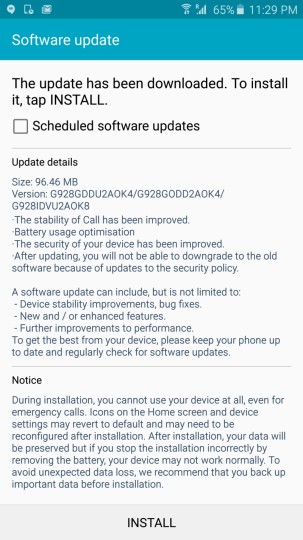
Your Phone should be on Stock firmware to Install the update . To get this update you have to manually check for updates by going to Settings > About Phone > Updates .
via
Samsung Galaxy S6 edge plus is getting 96.46 MB software update which will Bring the following changes to your Samsung Galaxy S6 edge plus . The update is based on Android Lollipop only .
- Device Stability improvements , bug fixes .
- New and / or enhanced features .
-Further improvements to performance and more
Your Phone should be on Stock firmware to Install the update . To get this update you have to manually check for updates by going to Settings > About Phone > Updates .
via
Monday, 12 October 2015
[Download] Samsung's Game Tuner App for S6 , S6 edge , S6 edge plus
Samsung has revealed its new app called Samsung Game Tuner app which is a very useful app for Gamer's . This app will get you to use advance control on your Gaming experience .
By Samsung's Game Tuner app one can play a Simple HD game in 2K resolution , One can unveil all the hidden gaming talent of their Smartphone .

Supported device for this Game Tuner app include - Galaxy S6, S6 edge, Note 5 and S6 edge+
Download - Play Store | Apkmirror
Saturday, 5 September 2015
Features that Android Marshmallow will bring to Samsung Devices
Google has already revealed new Android Marshmallow i.e Android 6.0 with Great features new interface .

Even Samsung is a great theme maker ( Touchwiz ) and will do its best in Making Android 6.0 Marshmallow more simpler and with new interface .
Samsung has also recently update S6 and S6 edge to new User Interface Same as S6 edge plus which is based on Android 5.1.1 Lollipop .
Samsung Has already revealed the list of features that Samsung Devices will get on Android Marshmallow 6.0 Update .
Even Samsung has announced list of devices that will get Android Marshmallow 6.0 .
- Samsung Galaxy S6 Edge Plus
- Samsung Galaxy Note 5
- Samsung Galaxy S6
- Samsung Galaxy S6 Edge
- Samsung Galaxy S6 Duos
- Samsung Galaxy Note 4 Duos
- Samsung Galaxy Note 4
- Samsung Galaxy Note Edge
- Samsung Galaxy Alpha
- Samsung Galaxy Tab A
Noble Rom [ S6 edge+ Themed ] for Samsung Galaxy S6
Samsung recently launched New Samsung Galaxy Note 5 and Samsung Galaxy S6 plus with new Touchwiz Interface .
The new Interface is very light and have new icons and new features . Every app is themed and there are lot more changes in the User interface .
Samsung Galaxy S6 will surely have a great developer support on xda and developers has already started to make Custom Roms for Samsung Galaxy S6 G920F version .
Thanks to Xda developer Gabri™ for making this lightest custom rom for Samsung Galaxy S6 which is based on S6 edge+ And Note 5 feature and interface . The rom is based on Official Samsung Galaxy S6 firmware of Android 5.1.1 Lollipop . It is the lightest and fast custom rom for Samsung Galaxy S6 . It comes with tons of features .
Features of Noble Rom for Samsung Galaxy S6 -
The new Interface is very light and have new icons and new features . Every app is themed and there are lot more changes in the User interface .
Samsung Galaxy S6 will surely have a great developer support on xda and developers has already started to make Custom Roms for Samsung Galaxy S6 G920F version .
Thanks to Xda developer Gabri™ for making this lightest custom rom for Samsung Galaxy S6 which is based on S6 edge+ And Note 5 feature and interface . The rom is based on Official Samsung Galaxy S6 firmware of Android 5.1.1 Lollipop . It is the lightest and fast custom rom for Samsung Galaxy S6 . It comes with tons of features .
Features of Noble Rom for Samsung Galaxy S6 -
- Many bloatware removed
- Pre rooted and Busybox installed
- Edge rom with features of Galaxy S6 Edge +
- Multi-User enabled
- Note 5 Default wallpaper pre-set
- New ringtones added of the Galaxy Note 5 like Skyline notifications and UI
- and more ...
Screenshots of Noble Rom for Samsung Galaxy S6 -


Note - We are not responsible for any damaged caused to your Smartphone , Do it on your own risk !
This rom is for G920F ( Samsung Galaxy s6 only )
Prerequisite - First you must be Rooted and have Custom Recovery Installed on Your Samsung Galaxy S6 , If you don't know how to root or Install custom recovery , follow these below guides -
How to Install Noble Rom on Samsung Galaxy S6 -
Step 1. Download The Noble Rom file for Samsung Galaxy S6 from below .
Step 2. Now boot to Custom recovery by pressing volume up + Power + Home button at the same time !
Step 3. Clear data / Clear cache and select Install zip from sdcard .
Step 4. Choose Vader Rom zip and Install it , then reboot your System after installation .
Step 5. Booting will take 5-15 minutes !
Thursday, 20 August 2015
Samsung Galaxy S6 and S6 edge getting S6 edge plus features update
Samsung recently launched New Samsung Galaxy Note 5 and Samsung Galaxy S6 plus with new Touchwiz Interface .
The new Interface is very light and have new icons and new features . Every app is themed and there are lot more changes in the User interface .
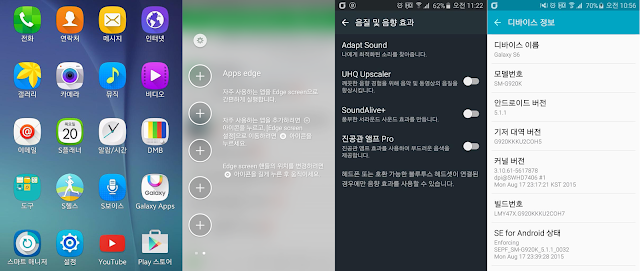
Samsung Galaxy S6 and S6 edge users are getting new update which will make their all features and user interface like Samsung Galaxy S6 edge Plus .
S6 active users will be also getting this update soon .
via
The new Interface is very light and have new icons and new features . Every app is themed and there are lot more changes in the User interface .

Samsung Galaxy S6 and S6 edge users are getting new update which will make their all features and user interface like Samsung Galaxy S6 edge Plus .
S6 active users will be also getting this update soon .
via
Subscribe to:
Posts (Atom)