Showing posts with label Rom. Show all posts

Tuesday, 12 April 2016

MIUI Firmware | Stable | Developer | Global | Custom | ROM

Da ich jetzt ein paar Anleitungen veröffentlichen werden, müssen erst einmal die Grundlagen erklärt und verstanden werden. Aus diesem Grund will ich euch erklären, was es jetzt für Unterschiede gibt und welche ROM (Firmware) für euch die richtige Wahl wäre. Gleich zu Beginn: Alle Artikel über dieses Thema, die vor 2016 online veröffentlicht wurden, sind veraltet und somit unbrauchbar! Xiaomi hat vieles geändert und genau aus diesem Grund gibt es so viele Unklarheiten in Foren.
MIUI V7 von xiaomi.eu
MIUI ist ein stark angepasstes Android, von Xiaomi, welches sich von den Grundfunktion nicht von anderen Android-Smartphones unterscheidet. Bei Samsung wäre es TouchWiz-UI, bei Xiaomi ist es MIUI (UI steht für User Interface - Benutzeroberfläche).

Zu Beginn gab es nur 2 verschiedene Versionen von MIUI:
- Stable ROM
- Developer ROM (oft auch nur Dev ROM)

Ende 2015 gibt es 4 verschiedene ROM's.
- Stable ROM China
- Developer ROM China
- Stable ROM Global
- Developer ROM Global
Das Xiaomi Mi 5 ist jetzt etwa einen Monat alt. Momentan habt Ihr die Wahl zwischen 2 ROM's. Neben der Stable ROM gibt es die Developer ROM
Momentan gibt es nur Xiaomi Mi 5 China
Beim Redmi Note 3 haben wir eine größere Auswahl.
- Redmi Note 3 Qualcomm Global
- Redmi Note 3 Qualcomm China
- Redmi Note 3 MTK China
Einige Geräte werden in mehreren Versionen angeboten, wie das Redmi Note 3. Es gibt eine Version mit MTK (MediaTek) Chip aber auch eine mit Qualcomm (Snapdragon) Chip. In Indien kann die MTK Version nicht verkauft werden, deshalb gibt es neben dieser MTK-Version eine weitere Version mit dem Snapdragon 650, welche aber auch in China angeboten wird.
Somit gibt es im Grunde immer zwei verschiedene ROM's.
Stable ROM: Die Stable ROM ist die Firmware, welche immer drauf ist, nach dem Kauf, von Werk aus... wie der Name schon verrät - es ist eine stabile Version, für den täglichen Gebrauch geeignet. Updates gibt es alle 1-2-3 Monate, zu Beginn (kurz nach dem Verkaufsstart) auch mal 1 bis 2 Updates pro Monat. Kauft Ihr euch ein MI5 in China, dann wird es Stable Rom China sein, in Indien wäre es Stable Rom Global.
Developer ROM: Jeden Freitag erscheint die Developer ROM (Ausnahme wären Feiertage in China). An der Versionsnummer könnt Ihr sofort erkennen, wann die Firmware veröffentlicht wurde. Im Screenshot oben steht 6.3.31 und das würde bedeutet 2016.03.31 (31.03.2016). Auch wenn Developer übersetzt Entwickler bedeutet, kann diese ROM auch von jedem "Normalo" genutzt werden. Im Vergleich zur Stable ROM gibt es hier Root und alleine aus dem Grund nutzen viele diese ROM. Alle neuen Funktionen und auch Verbesserungen werden zuerst hier eingespielt und getestet. Sobald die Community und die Entwickler positives Feedback geben, kann das in die Stable ROM übernommen werden. Hier könnte es aber auch Probleme geben, wie zum Beispiel kein WLAN oder Bluetooth, das der Wecker nicht funktioniert, usw. usf. Das ist aber selten der Fall, nur besteht eben die Gefahr. Es werden keine Geräte mit Developer ROM ausgeliefert. Ihr könnt euch die Recovery ROM laden und per Updater App - wie oben beschrieben - die .zip Datei auswählen und von Stable zu Developer wechseln. Momentan aber nur von China zu China und nicht von Global zu China oder von China zu Global. Hier müsst Ihr dann auch mit dem MiFlash Tool arbeiten (dazu später mehr).
China: Wäre die Firmware für China. Es gibt nur englisch oder chinesisch als Auswahl (Sprache), keine Google Dienste und ein paar chinesische Apps/Anwendungen, mit welchem wir nichts anfangen können (sind dann oft sogar nur chinesisch).
Global: Ende 2015 gibt es neben China auch noch Global ROM's/Firmware. Bei dieser Firmware gibt es mehrere Sprachen, auch wenn einige schlecht oder nur teilweise übersetzt wurden. Die China-Apps wurden entfernt (oft bleiben nur 2-3 übrig) und Google Play ist von Werk aus installiert. Neue Sprachen erscheinen zuerst bei der Developer ROM und werden später in die Stable ROM übertragen. Sollte es Deutsch zu Beginn nicht geben, dann ist es oft eine Frage von ein paar Wochen, bis diese eingefügt wird.
Wenn Ihr euch ein Xiaomi-Smartphone aus China bestellt, dann bekommt Ihr zu 99% ein Smartphone mit "Vendor Firmware". Das der Bootloader gesperrt ist hilft hier nicht.
Die ROM ist oft an der Versionsnummer zu erkennen. Im Screenshot oben ist 7.1.99.99 zu sehen. Sucht man nach der Firmware, dann findet man die zum Download nicht.

Mit so einer Firmware bekommt Ihr keine Updates und beim Versuch eine Firmware zu flashen (installieren) bekommt Ihr nur eine Fehlermeldung, wie zum Beispiel "can't verify update" oder die Update wird gestartet und es passiert am Ende nichts, nur ein Neustart.
Ihr habt hier nur einen Weg, um euch zu befreien - MiFlash

Und so kommen wir auch zum letzten Punkt: Fastboot ROM und Recovery ROM
Durch die Dateiendung könnt Ihr sofort sehen, ob es sich um eine Fastboot oder Recovery ROM handelt. Die Fastboot ROM's bekommt in der Regeln nur im Forum, im MIUI Forum von den Admins oder Moderatoren. Hier mal ein Beispiel:
Recovery ROM: Dateiendung ist immer .zip, nur für die Updater App geeignet.
Fastboot ROM: Niemals eine .zip Datei (.tgz oder .tar), für das MiFlash Tool oder Fastboot.
Von der SD-Karte installieren, um eine Recovery ROM zu flashen (installieren)
Ihr habt im System eine App, welche sich Updater nennt. Ruft Ihr die weiteren Einstellungen auf, wie oben im Bild, dann findet Ihr den Punkt "Von SD-Karte installieren". Darüber könnt Ihr zum Beispiel von Stable zu Developer wechseln. Ihr müsst hier nur auf die Dateiendung achten und auf die Region (China oder Global).
Bekommt Ihr ein Smartphone mit Stable ROM China, dann könnt Ihr nicht (über die Updater App) zu Stable ROM Global oder Developer ROM Global wechseln - die Region passt nicht.
Jede andere ROM ist eine Custom ROM (nicht von Xiaomi selbst). Darunter zählen ROM's wie die von xiaomi.eu oder sMIUI. Hier habt Ihr keine China-Apps und eine perfekte Übersetzung. Die Basis wäre die ROM von Xiaomi selbst, nur angepasst - deshalb Custom ROM.
Diese könnt Ihr nur installieren, wenn Ihr den Bootloader entsperrt und ein Custom Recovery flasht, wie zum Beispiel TWRP.
Damals (vor 2016) konntet Ihr euch einfach die ROM herunterladen, als .zip-Datei und diese direkt über das MI-Recovery flashen. 2016 bekommt Ihr oft nicht einmal das Mi-Recovery mehr zu sehen, selbst nachdem der Bootloader entsperrt wurde.

Thursday, 21 January 2016

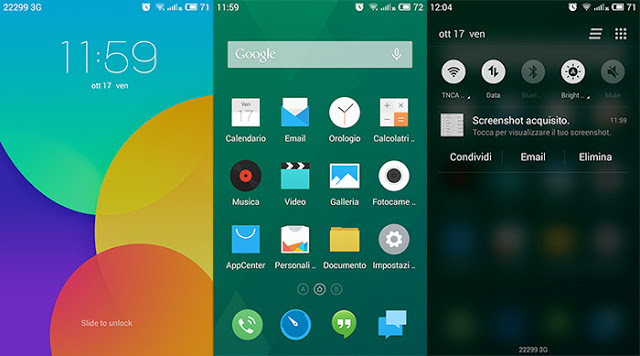
How to Install Flyme Os 4.5 on Samsung Galaxy S6

Samsung Galaxy S6 has many Custom Roms based on Samsung based Android Lollipop Touchwiz firmware . Few weeks back Samsung Galaxy S6 also get Cyanogenmod 13 ( Marshmallow ) .


So , Here is a new Custom Rom for Samsung Galaxy S6 . The New Rom is Flyme Os 4.5 which is based on Android 5.1.1 Lollipop . The new Rom is ported from Meizu Pro 5 by whymoo ( xda dev ) .


Screenshots -


Note - We are not responsible for any damaged caused to your Smartphone , Do it on your own risk !

It will only Work on -

Galaxy S6 Taiwan, China Mobile (SM-G9208)
Galaxy S6 Taiwan, Hong Kong, Open China (SM-G9250)
Galaxy S6 Sprint (SM-G920P, SM-G925P)


Prerequisite - First you must be Rooted and have Custom Recovery Installed on Your Samsung Galaxy S6 , If you don't know how to root or Install custom recovery , follow these below guides -


How to Install Flyme Os Rom on Samsung Galaxy S6 -

Step 1. Download Flyme Os Rom file for Samsung Galaxy S6 from below . 

Step 2. Now boot to Custom recovery by pressing volume up + Power + Home button at the same time !

Step 3. Clear data / Clear cache and select Install zip from sdcard .

Step 4. Choose Flyme Os Rom zip and Install it , then reboot your System after installation .

Step 5. Booting will take 5-15 minutes !


Downloads -

Flyme Os Rom  - Download Here ( via )

Gapps - Download Here


Saturday, 5 September 2015

Noble Rom [ S6 edge+ Themed ] for Samsung Galaxy S6


Samsung recently launched New Samsung Galaxy Note 5 and Samsung Galaxy S6 plus with new Touchwiz Interface .


The new Interface is very light and have new icons and new features . Every app is themed and there are lot more changes in the User interface .

Samsung Galaxy S6 will surely have a great developer support on xda and developers has already started to make Custom Roms for Samsung Galaxy S6 G920F version .


Thanks to Xda developer Gabri™ for making this lightest custom rom for Samsung Galaxy S6 which is based on S6 edge+ And Note 5 feature and interface . The rom is based on Official Samsung Galaxy S6 firmware of Android 5.1.1 Lollipop . It is the lightest and fast custom rom for Samsung Galaxy S6 . It comes with tons of features .

Features of  Noble Rom for Samsung Galaxy S6 -


  • Many bloatware removed
  • Pre rooted and Busybox installed
  • Edge rom with features of Galaxy S6 Edge +
  • Multi-User enabled 
  • Note 5 Default wallpaper pre-set 
  • New ringtones added of the Galaxy Note 5 like Skyline notifications and UI
  •  and more ...
Screenshots of  Noble Rom for Samsung Galaxy S6 -


Note - We are not responsible for any damaged caused to your Smartphone , Do it on your own risk !

This rom is for G920F ( Samsung Galaxy s6 only ) 


Prerequisite - First you must be Rooted and have Custom Recovery Installed on Your Samsung Galaxy S6 , If you don't know how to root or Install custom recovery , follow these below guides -


How to Install Noble Rom on Samsung Galaxy S6 -

Step 1. Download The Noble Rom file for Samsung Galaxy S6 from below . 

Step 2. Now boot to Custom recovery by pressing volume up + Power + Home button at the same time !

Step 3. Clear data / Clear cache and select Install zip from sdcard .

Step 4. Choose Vader Rom zip and Install it , then reboot your System after installation .

Step 5. Booting will take 5-15 minutes !


Downloads -

Noble Rom  - Download Here


Friday, 14 August 2015

Alex-V Personal Rom for Samsung Galaxy S6 edge


Samsung Galaxy S6 edge will surely have a great developer support on xda and developers has already started to make Custom Roms for Samsung Galaxy S6 edge .


Thanks to Xda developer Alex-V for sharing this lightest custom rom for Samsung Galaxy S6 edgeThe rom is based on Official Samsung Galaxy S6 edge firmware of Android 5.1.1 Lollipop . It is the lightest and fast custom rom for Samsung Galaxy S6 . It comes with tons of features .

Features of  Alex-V Rom for Samsung Galaxy S6 -

  • debloated
  • zipaligned
  • custom kernel
  • pre rooted
  • 5 way reboot
  • new bootanimation
  • and themed to great extent
  •  and more...

Screenshots of  Alex-V Rom for Samsung Galaxy S6 -


Alex-V Personal Rom for Samsung Galaxy S6 edge


Note - We are not responsible for any damaged caused to your Smartphone , Do it on your own risk !

This rom is for Samsung Galaxy s6 edge only .


Prerequisite - First you must be Rooted and have Custom Recovery Installed on Your Samsung Galaxy S6 edge , If you don't know how to root or Install custom recovery , follow these below guides -


You Must be on Lates Android 5.1.1 Bootloader to Install This Rom

How to Install Alex-V Rom on Samsung Galaxy S6 edge -

Step 1. Download The Alex-V Rom file for Samsung Galaxy S6 edge from below . 

Step 2. Now boot to Custom recovery by pressing volume up + Power + Home button at the same time !

Step 3. Clear data / Clear cache and select Install zip from sdcard .

Step 4. Choose Alex-V Personal Rom zip and Install it , then reboot your System after installation .

Step 5. Booting will take 5-15 minutes !


Downloads -

Alex-V Personal Rom  - Download Here


ARCADIA v4.0 Rom for Samsung Galaxy S6


Samsung Galaxy S6 will surely have a great developer support on xda and developers has already started to make Custom Roms for Samsung Galaxy S6 G920F version .


Thanks to Xda developer iB4STiD for making this lightest custom rom for Samsung Galaxy S6 . The rom is based on Official Samsung Galaxy S6 firmware of Android 5.1.1 Lollipop . It is the lightest and fast custom rom for Samsung Galaxy S6 . It comes with tons of features .

Features of  ARCADIA Rom for Samsung Galaxy S6 -


  • Many bloatware removed
  • Pre rooted and Busybox installed
  • No boot sound
  • Knox 100% Free
  • Extender Reboot menu 
  •  and more ...
Screenshots of  ARCADIA Rom for Samsung Galaxy S6 -


ARCADIA v4.0 Rom for Samsung Galaxy S6


Note - We are not responsible for any damaged caused to your Smartphone , Do it on your own risk !

This rom is for G920F ( Samsung Galaxy s6 only ) 


Prerequisite - First you must be Rooted and have Custom Recovery Installed on Your Samsung Galaxy S6 , If you don't know how to root or Install custom recovery , follow these below guides -


How to Install ARCADIA Rom on Samsung Galaxy S6 -

Step 1. Download The ARCADIA Rom file for Samsung Galaxy S6 from below . 

Step 2. Now boot to Custom recovery by pressing volume up + Power + Home button at the same time !

Step 3. Clear data / Clear cache and select Install zip from sdcard .

Step 4. Choose Vader Rom zip and Install it , then reboot your System after installation .

Step 5. Booting will take 5-15 minutes !


Downloads -

ARCADIA v4.0 Rom  - Download Here


Vader Rom for Samsung Galaxy S6


Samsung Galaxy S6 will surely have a great developer support on xda and developers has already started to make Custom Roms for Samsung Galaxy S6 G920F version .


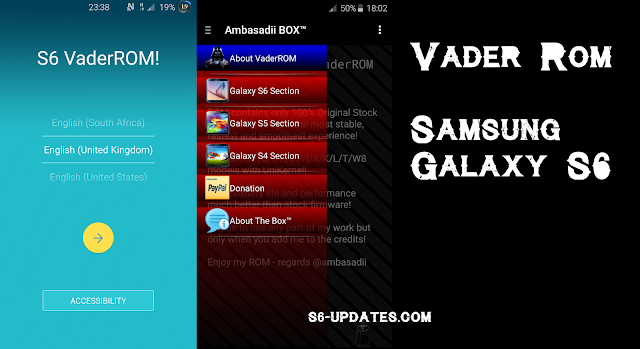
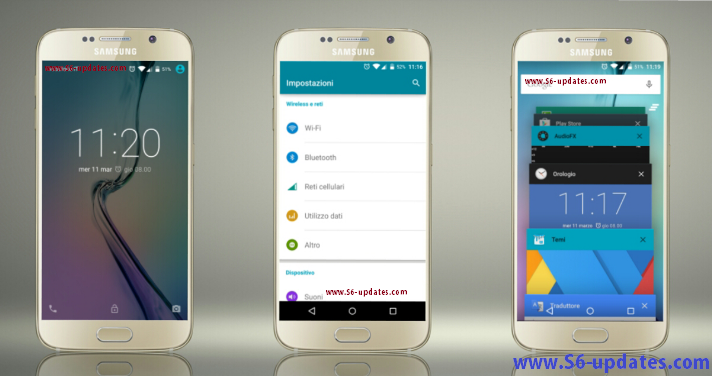
Thanks to Xda developer ambasadii for making this lightest custom rom for Samsung Galaxy S6 . The rom is based on Official Samsung Galaxy S6 firmware of Android 5.1.1 Lollipop . It is the lightest and fast custom rom for Samsung Galaxy S6 . It comes with tons of features .

Features of  Vader Rom for Samsung Galaxy S6 -


  • Many bloatware removed
  • Pre rooted and Busybox installed
  • Aroma
  • Knox 100% Free
  • Zipaligned 
  •  and more ...
Screenshots of  Vader Rom for Samsung Galaxy S6 -


Vader Rom for Samsung Galaxy S6


Note - We are not responsible for any damaged caused to your Smartphone , Do it on your own risk !

This rom is for G920F ( Samsung Galaxy s6 only ) 


Prerequisite - First you must be Rooted and have Custom Recovery Installed on Your Samsung Galaxy S6 , If you don't know how to root or Install custom recovery , follow these below guides -


How to Install Vader Rom on Samsung Galaxy S6 -

Step 1. Download The Vader Rom file for Samsung Galaxy S6 from below . 

Step 2. Now boot to Custom recovery by pressing volume up + Power + Home button at the same time !

Step 3. Clear data / Clear cache and select Install zip from sdcard .

Step 4. Choose Vader Rom zip and Install it , then reboot your System after installation .

Step 5. Booting will take 5-15 minutes !


Downloads -

Vader Rom  - Download Here


Wednesday, 8 July 2015

Clean Rom for Verizon Galaxy S6


Samsung Galaxy S6 recently got Android 5.1.1 Lollipop update and Verizon users can update it . Hence Mostly users install custom rom because they are more fast and user friendly .

Also Read - How to Install Stock Firmware on T-Mobile Galaxy S6


Verizon users can now install Clean custom rom , which is developer by scrosler ( xda developer ) . This Custom rom is very fast and has very less bugs .


Review Video -


There are many features in Clean Rom , few of them includes -

  • Deodexed
  • Rooted
  • Clean like Google Stock Lollipop
  • Vanilla themed 
  • and more ...

How to Install Clean Custom Rom on Verizon Galaxy S6 -

Note - We are not responsible for any damaged caused to your Smartphone , Do it on your own risk !

This rom is for Verizon ( Samsung Galaxy s6 only ) 


Prerequisite - First you must be Rooted and have Custom Recovery Installed on Your Verizon Samsung Galaxy S6 , If you don't know how to root or Install custom recovery , google it or find it at Xda .


How to Install Clean Rom on Verizon Samsung Galaxy S6 -

Step 1. Download The Clean Rom file for Samsung Galaxy S6 from below . 

Step 2. Now boot to Custom recovery by pressing volume up + Power + Home button at the same time !

Step 3. Clear data / Clear cache and select Install zip from sdcard .

Step 4. Choose Clean Rom zip and Install it , then reboot your System after installation .

Step 5. Booting will take 5-15 minutes !


Downloads -

Clean Rom  - Download Here


Friday, 3 July 2015

[Android 5.1.1] TWRP 2.8.7.1 recovery for Samsung Galaxy S6 edge


Finally Samsung Galaxy S6 G920F edge gets TWRP recovery , but with lots of bugs  . Samsung Galaxy S6 edge is the flagship phone of Samsung and it will be very popular , also it will get all the official support by the developers .


TWRP is a touch based custom recovery , which is used to Install custom roms and mods . You must be rooted to Install TWRP custom recovery .


Note - This recovery is for Samsung Galaxy edge ( G920F ) only . We are not responsible for Any damage caused to your Smartphone .

You must be rooted in order to Install TWRP recovery - Follow This guide to Root your Samsung Galaxy Edge

How to Install TWRP recovery on Samsung Galaxy S6 edge -

Follow This Guide to Install Android 5.1.1 TWRP on Samsung Galaxy S6 edge .

Wednesday, 27 May 2015

Dennis Rom for AT&T Samsung Galaxy S6


Samsung Galaxy S6 AT&T will surely have a great developer support on xda and developers has already started to make Custom Roms for Samsung Galaxy S6 AT&T version .


Thanks to Xda developer scrosler for sharing this Dennis custom rom for Samsung Galaxy S6 AT&T . The rom is based on Official Samsung Galaxy S6 firmware of Android 5.0.2 Lollipop . It is the lightest and fast custom rom for AT&T Samsung Galaxy S6 . It comes with tons of features .

Features of  Dennis Rom for AT&T Samsung Galaxy S6 -


  •  pre rooted
  •  de-bloated 
  •  busybox 
  •  removed knox
  •  was removed unnecessary applications
  •  and more...

Screenshots of  Dennis Rom for AT&T Samsung Galaxy S6 -


Note - We are not responsible for any damaged caused to your Smartphone , Do it on your own risk !

This rom is for AT&T ( Samsung Galaxy s6 only ) 


Prerequisite - First you must be Rooted and have Custom Recovery Installed on Your AT&T Samsung Galaxy S6 , If you don't know how to root or Install custom recovery , google it or find it at Xda .


How to Install Dennis Rom on AT&T Samsung Galaxy S6 -

Step 1. Download The Dennis Rom file for AT&T Samsung Galaxy S6 from below . 

Step 2. Now boot to Custom recovery by pressing volume up + Power + Home button at the same time !

Step 3. Clear data / Clear cache and select Install zip from sdcard .

Step 4. Choose Dennis Rom zip and Install it , then reboot your System after installation .

Step 5. Booting will take 5-15 minutes !


Downloads -

Dennis Rom  - Download Here


Clean Rom for AT&T Samsung Galaxy S6


Samsung Galaxy S6 AT&T will surely have a great developer support on xda and developers has already started to make Custom Roms for Samsung Galaxy S6 AT&T version .


Thanks to Xda developer scrosler for sharing this Clean custom rom for Samsung Galaxy S6 AT&T . The rom is based on Official Samsung Galaxy S6 firmware of Android 5.0.2 Lollipop . It is the lightest and fast custom rom for AT&T Samsung Galaxy S6 . It comes with tons of features .

Features of  Clean Rom for AT&T Samsung Galaxy S6 -


  •  pre rooted
  •  de-bloated 
  •  busybox 
  •  removed knox
  •  was removed unnecessary applications
  •  and more...

Screenshots of  Clean Rom for AT&T Samsung Galaxy S6 -


Note - We are not responsible for any damaged caused to your Smartphone , Do it on your own risk !

This rom is for AT&T ( Samsung Galaxy s6 only ) 


Prerequisite - First you must be Rooted and have Custom Recovery Installed on Your AT&T Samsung Galaxy S6 , If you don't know how to root or Install custom recovery , google it or find it at Xda .


How to Install Clean Rom on Samsung Galaxy S6 -

Step 1. Download The Clean Rom file for Samsung Galaxy S6 from below . 

Step 2. Now boot to Custom recovery by pressing volume up + Power + Home button at the same time !

Step 3. Clear data / Clear cache and select Install zip from sdcard .

Step 4. Choose Clean Rom zip and Install it , then reboot your System after installation .

Step 5. Booting will take 5-15 minutes !


Downloads -

Clean Rom  - Download Here


Monday, 25 May 2015

CarHD Rom for Samsung Galaxy S6 edge


Samsung Galaxy S6 edge will surely have a great developer support on xda and developers has already started to make Custom Roms for Samsung Galaxy S6 edge .


Thanks to Xda developer Carotix for sharing this lightest custom rom for Samsung Galaxy S6 edgeThe rom is based on Official Samsung Galaxy S6 edge firmware of Android 5.0.2 Lollipop . It is the lightest and fast custom rom for Samsung Galaxy S6 . It comes with tons of features .

Features of  CarHD Rom for Samsung Galaxy S6 -

  • debloated
  • zipaligned
  • custom kernel
  • pre rooted
  • 5 way reboot
  • new bootanimation
  • and themed to great extent
  •  and more...

Screenshots of  CarHD Rom for Samsung Galaxy S6 -


Note - We are not responsible for any damaged caused to your Smartphone , Do it on your own risk !

This rom is for Samsung Galaxy s6 edge only .


Prerequisite - First you must be Rooted and have Custom Recovery Installed on Your Samsung Galaxy S6 edge , If you don't know how to root or Install custom recovery , follow these below guides -


How to Install CarHD Rom on Samsung Galaxy S6 edge -

Step 1. Download The CarHD Rom file for Samsung Galaxy S6 edge from below . 

Step 2. Now boot to Custom recovery by pressing volume up + Power + Home button at the same time !

Step 3. Clear data / Clear cache and select Install zip from sdcard .

Step 4. Choose CarHD Rom zip and Install it , then reboot your System after installation .

Step 5. Booting will take 5-15 minutes !


Downloads -

CarHD Rom  - Download Here


Tuesday, 28 April 2015

ANATOLIA ROM for Samsung Galaxy S6

Samsung Galaxy S6 will surely have a great developer support on xda and developers has already started to make Custom Roms for Samsung Galaxy S6 G920F version .


Thanks to Xda developer murat25750 for sharing this lightest custom rom for Samsung Galaxy S6 . The rom is based on Official Samsung Galaxy S6 firmware of Android 5.0.2 Lollipop . It is the lightest and fast custom rom for Samsung Galaxy S6 . It comes with tons of features .

Features of  ANATOLIA Rom for Samsung Galaxy S6 -

  •  unmodified simple stoc completely
  •  stock kernel
  •  supersu v2.46
  •  call button
  •  call recording
  •  multi language
  •  scanner exit warning
  •  was removed unnecessary applications
  •  and more...

Screenshots of  ANATOLIA Rom for Samsung Galaxy S6 -

ANATOLIA ROM for Samsung Galaxy S6

ANATOLIA ROM for Samsung Galaxy S6


Note - We are not responsible for any damaged caused to your Smartphone , Do it on your own risk !

This rom is for G920F ( Samsung Galaxy s6 only ) 


Prerequisite - First you must be Rooted and have Custom Recovery Installed on Your Samsung Galaxy S6 , If you don't know how to root or Install custom recovery , follow these below guides -


How to Install ANATOLIA Rom on Samsung Galaxy S6 -

Step 1. Download The ANATOLIA Rom file for Samsung Galaxy S6 from below . 

Step 2. Now boot to Custom recovery by pressing volume up + Power + Home button at the same time !

Step 3. Clear data / Clear cache and select Install zip from sdcard .

Step 4. Choose ANATOLIA Rom zip and Install it , then reboot your System after installation .

Step 5. Booting will take 5-15 minutes !


Downloads -

ANATOLIA Rom  - Download Here


[Fast][No-Bloatware] SpaceX Mod for Samsung Galaxy S6

Samsung Galaxy S6 comes with many pre-installed apps and most of them are non removable . But a great thanks for Xda developer Manh_IT for making first Mod for Samsung Galaxy S6 . 

Space X Mod lets you Install and Remove many features and bloatwares . Also it adds a performance tweaks to your Samsung Galaxy S6 . 


SpaceX Mod for Samsung Galaxy S6


Features of SpaceX Mod for Samsung Galaxy S6 -


  • Busybox 
  • Remove Bloatware
  • Message tweaks
  • Call Recording 
  • and more ...


Note - This mode is only for G920F/G920I ( Samsung Galaxy S6 ) and we are not responsible for any damage caused to your Smartphone . Last one - Install it on Stock rom only !

 Prerequisite - First you must be Rooted and have Custom Recovery Installed on Your Samsung Galaxy S6 , If you don't know how to root or Install custom recovery , follow these below guides -


How to Install SpaceX Mod on Samsung Galaxy S6 -

Step 1. Download The SpaceX Mod file for Samsung Galaxy S6 from below . 

Step 2. Now boot to Custom recovery by pressing volume up + Power + Home button at the same time !

Step 3. Choose SpaceX Mod zip and Install it , then reboot your System after installation .

Step 4. Booting will take 5-15 minutes !


Downloads -

SpaceX Mod  - Download Here


Thursday, 23 April 2015

VN™ ROM for Samsung Galaxy S6

Samsung Galaxy S6 will surely have a great developer support on xda and developers has already started to make Custom Roms for Samsung Galaxy S6 G920F version .


Thanks to Xda developer nguyenxuanhoa for sharing this lightest custom rom for Samsung Galaxy S6 . The rom is based on Official Samsung Galaxy S6 firmware of Android 5.0.2 Lollipop . It is the lightest and fast custom rom for Samsung Galaxy S6 . It comes with tons of features .

Features of  VN™ Rom for Samsung Galaxy S6 -


  • Features : v1.0
  • -Deodexed
  • -Rooted & Zipaligned 
  • -Add Busybox
  • -Removed Samsung Apps and Knox
  • -Enabled Call button on Contacts list
  • -Enabled Call/message Block
  • and more
Screenshots of  VN™ Rom for Samsung Galaxy S6 -


Note - We are not responsible for any damaged caused to your Smartphone , Do it on your own risk !

This rom is for G920F ( Samsung Galaxy s6 only ) 


Prerequisite - First you must be Rooted and have Custom Recovery Installed on Your Samsung Galaxy S6 , If you don't know how to root or Install custom recovery , follow these below guides -


How to Install VN™ Rom on Samsung Galaxy S6 -

Step 1. Download The VN™ Rom file for Samsung Galaxy S6 from below . 

Step 2. Now boot to Custom recovery by pressing volume up + Power + Home button at the same time !

Step 3. Clear data / Clear cache and select Install zip from sdcard .

Step 4. Choose VN™ Rom zip and Install it , then reboot your System after installation .

Step 5. Booting will take 5-15 minutes !


Downloads -

VN™ Rom Beta  - Download Here