Showing posts with label Lenovo P70 Root. Show all posts

Tuesday, 19 April 2016

How to Root Lenovo P70


how to root lenovo p70 twrp recovery
 
Rooting Lenovo P70 with TWRP recovery
Probably you can't Root Lenovo P70 with KingRoot or other apps you can Root Lenovo P70 with TWRP custom recovery.If you haven't TWRP already done so, check out this post.
So, after flashing TWRP recovery on Lenovo P70 follow next steps.

How to Root instructions Lenovo P70:
  1. Turn off Lenovo P70.
  2. Boot into recovery with holding first Volume UP then Power Button for 5sec.

  3. Go to recovery with Volume UP and enter with Volume DOWN.
  4. Just go to Reboot and Reboot system.


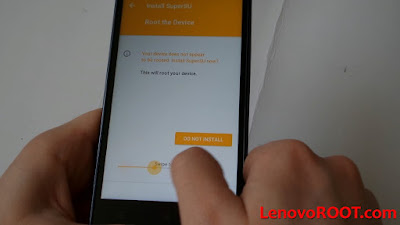
  5. Warning screen will be appear and described you're device not Rooted and It will ask you to Root Lenovo P70.
  6. Swipe to install.


  7. And boom you must to have Root on Lenovo P70!
  8. That's it! 
 Note: If message to install Root not appear.Download Root package from below and install it: Rooting Lenovo P70 package
   
      Video Tutorial of How to Root Lenovo P70

    Tuesday, 16 February 2016

    One click root Lenovo P70

    how to root lenovo p70 one click

    In this post I'll describe How to root Lenovo P70 easily.
    It's simple as ABC by downloading APP which roots device then root with single click.

    1. So at first download on mobile KingRoot from this - LINK
    2. Make sure you're allowed Unknown sources to be installed in Settings - > Security - > Unknown sources


    3. Then go to install KingRoot APK 


    4. Then it takes around 2minutes and finally you need to have Rooted Lenovo P70 as you will see message on the screen Rooted successfully!


     Finally you will see this message! Root Successfully Mode: Lenovo P70-A


    note: it might only work with Android KitKat 4.4 for now, Lollipop version not be rooted throught this APP.


    Disclaimer: I'm or anyone not responsible for any damage on your phone!
    advertisment