Get all-powerful and best custom ROM developed ever.CyanogenMod 13 a.k.a CM13 is available now for Lenovo P70.Get latest version of CM based on Android Open Source Project Marshmallow 6.0.Always better than earlier versions, more faster, more smoother, new features, stronger security and many more.
Scatter Files: 1. Scatter from firmware Stock Lenovo P70S134 Android KitKat 4.4 - link 2. Scatter from firmware Stock Lenovo P70S139 Android KitKat 5.1- link 3. Some other scatter - link
VIBE UI version 3.5 Marshmallowfor Lenovo P70 it's 64bit based custom ROM. It's latest Lenovo User Interface VIBE UI can meet in Lenovo K3 Note, Lenovo Vibe S1, Lenovo A7000, Lenovo Vibe P1.
What's not working: - front camera Installation: important: disable quick boot in Lollipop (settings->accessibility->fast boot) or in Kitkat (hold power button and untick fast boot)
if you don't have external SD and internal storage is only 1024mb do following: - go to wipe - advanced wipe - tick data,internal storage,system,cache,dalvik - swipe to wipe - reboot recovery - and proceed to copy ROM
Copy files VIBE UI and fixes to SD card or internal SD
Install ROM from TWRP!
Install fixes too!
That's it, Enjoy it!
Required files: - x64 Lollipop - link - Drivers for Lenovo P70 (for win7, win8, win10) - link - Sp flash tool - link - VIBE UI ROM - link fixes: fix1 - link fix2 - link fix3 - link
Scatter files: 1. Scatter from firmware Stock Lenovo P70S134 Android KitKat 4.4 - link 2. Scatter from firmware Stock Lenovo P70S139 Android KitKat 5.1- link 3. Some other scatter - link
If not clearly installation check out video installation of VIBE UI on Lenovo P70
So here's the CyanogenMod 12.1 x64 for Lenovo P70 updatable(OTA updates) just in settings CyanogenMod system updates, after developer of this ROM pushes fresh build you can update easily by downloading update from settings then newly build will be installed automatically once you confirm installation.
Some word about this build: It's stable custom ROM for daily use not in beta stage but, of course it may contains some bugs which might not discover by you, also not working things.
Date of build: 31/03/2016 Language: English, Russian, Ukrainian, Czech, Slovak Installtion: Flashing via TWRP recovery Architecture: Android 5.1 (64 bit)
Available features in settings (but not more than in the AICP 10.0)
Not working:
No FM-radio;
No access to the Engineering menu;
There is no program to adjust the screen - MiraVision;
There is a problem with the sound in games (some sounds inhibited, wheezing sound itself) - the decision is sought;
Installation of CyanogeMod 12.1 64bit on Lenovo P70 make sure you've backed up your data like pictures, documents, etc. before proceeding flashing!
required files: - CM 12.1 64bit for Lenovo P70 - link - OpenGapps for Lollipop 5.1 x64 - link - Root zip package - link Transfer above files into internal memory or SDcard before anything!
You need from custom Recovery TWRP check out this post for installation
Boot into TWRP recovery by holding Volume up + Power button until you see black screen with textthen:
navigate to recovery with Volume up and select with Volume down
In TWRP go to WIPE -> Advanced -> check system, data, cache, davlik then confirm wiping!
After this go to install and choose zip file from your internal memory or SDcard depending on where you transfered cyanogenmod zip file.
So, here's the another custom ROM for Lenovo P70 which is called AICP it's based on CyanogenMod 12.1 but it provides amazing custom features, custom kernel and huge overall improvements. AICP ROM is stable for daily use, supports 3 languages - English, Russian, Ukrainian.
- Application Panel (side \ circular panel gestures to launch applications, Pie-navigation, waking the processor lock);
- Buttons (backlight control buttons, the setting on the lock screen, setting short and long press on each button);
Features of Kernel:
Also init.d on kernel
The kernel supports CIFS, NTFS, EXT,FAT.
Added BFQ scheduler.
Fixed display voltage battery in the CM Kernel supports the following key combinations for emergency stop, if you get bootloop: 1. 8 seconds hold Power 2. 8 seconds hold Power + Vol - 3. 8 seconds hold Power + Vol +
What's working:
Everything except:
FM-radio;
It does not work mode access point;
Do not run live wallpapers;
No access to the Engineering menu;
There is no program to adjust the screen brightness,contast,color - MiraVision;
No connection to the PC mode - Mass storage (USB-stick);
The audio settings and notifications, there are two identical ringtone: Themos and Titania;
Widget "Next Steps" is not added to the desktop (leading to Settings error);
How to install AICP custom ROM on Lenovo P70:
Again Installation thought SP FLASH TOOL
Before flashing this ROM you need to flash AOSP 64bit ROM - download here
Follow step from CyanogenMod 12.1 flashing in this post it's the same instructions!
If you think it's not clear check out below video tutorial
Ohhhhhhhhh yeah CyanogenMod 12.1 for Lenovo P70 that's amazing.Fastest and smoothest custom ROM ever developed is CyanogenMod and available for Mediatek based Android device Lenovo P70 with MTK6752. Almost any user want to have and use CyanogenMod ROM on their Android device but CyanogenMod firmware is specific for some chipset, cpu, so, so... as well as needed to be build for each one individually and that's not easy effort and for thus it not available for every every Android device. Well, in this post I'll show you How to install CyanogenMod 12.1 on Lenovo P70-A. It's 64bit for Lenovo's P70 CPU MTK6752 and working amazing, very smooth with great features developed from CyanogenMod. As I said it's 64bit based ROM and you need first to install Andoid Lollipop 5.1 64bit then CyanogenMod otherwise it will not work. Warning: Before anything to do make sure you've backed up your files from internal memory like pictures,documents,apps etc. all information will be erased as well as current firmware on your Lenovo P70 when you flash firmware via Sp flash tool.DO IT AT YOUR OWN RISK! So, let's begin :
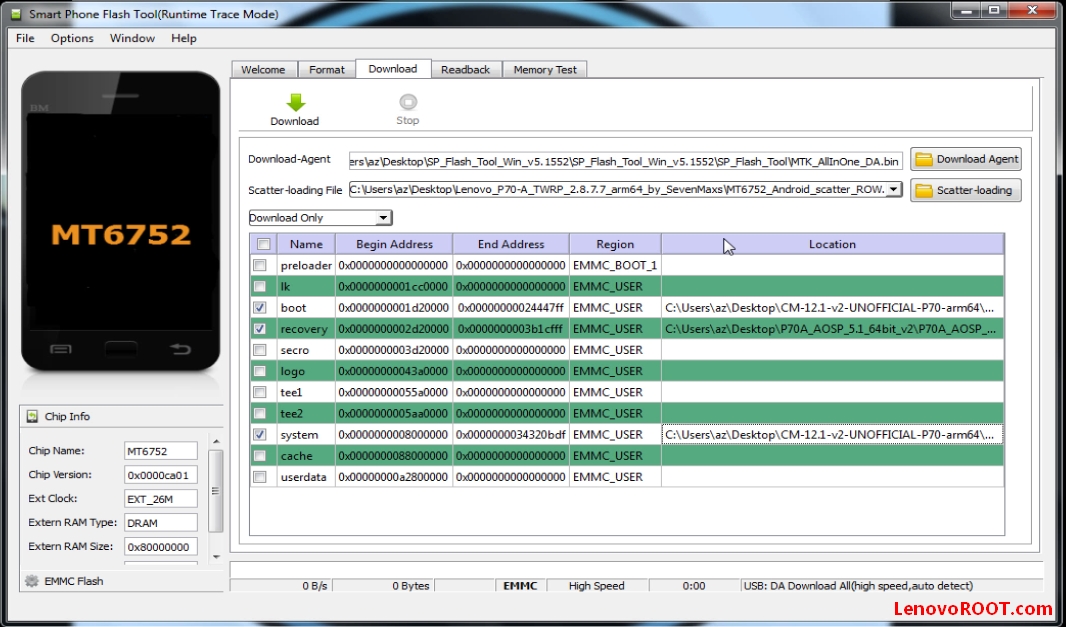
download required files: - Android Lollipop 5.1 64bit for Lenovo P70 - link - CyanogenMod 12.1 64bit for Lenovo P70 - link - Sp Flash Tool for Lenovo P70 - link - Drivers for Lenovo P70 - link - Gapps CyanogenMod 12.1 64bit for Lenovo P70 - link (put into SDcard or internal memory) - Root zip-link (put into SDcard or internal memory) 1. After downloading of files, unpack them somewhere. 2. Install at first drivers for Lenovo P70. 3. Then open flashtool exe from (Sp Flash Tool) and load scatter file from (Android Lollipop 5.1) folder.
4. All image files will be loading into Sp flash Tool there's only system.img & boot.img then press Download button and plug in the USB cable to Lenovo P70 and then PC.
5. After flashing of first Android Lollipop 5.1 64bit again make following: 6. Load scatter file from CyanogenMod 12.1 folder and again files loaded then press Download button and plug in the USB cable to Lenovo P70 and then PC.
7. Boot up into Recovery by pressing Volume up + Power button then on screen scroll up to recovery with Volume up and select with Volume down to enter into recovery. 8.It's time to flash from recovery Gapps (It's zip package with Google applications: PlayStore, Google+, Youtube etc.) and Root zip. Go to install and locate the gapps zip if you put already into external card if not plug USB cable and then copy from PC toLenovo P70. Make same for Root zip package! 10.Reboot system and Enjoy! That's it you now would've CyanogenMod 12.1 on Lenovo P70 :)
If you get an error on Sp Flash Tool PMT changed for the ROM it must be downloaded try with one of these scatter files:
1. Scatter from firmware Stock Lenovo P70S134 Android KitKat 4.4 - link 2. Scatter from firmware Stock Lenovo P70S139 Android KitKat 5.1- link 3. Some other scatter - link
Here's the video tutorial of installing CyanogeMod 12.1 on Lenovo P70
advertisment
CyanogeMod Lenovo P70 compiled by Zormax. Android Lollipop 5.1 64bit by Zormax. Tutorial by GaDDMaNN
What's not working in this build: - FM radio - Miravision - Engineer menu!